A presentation timer that tells everyone when you'll finish
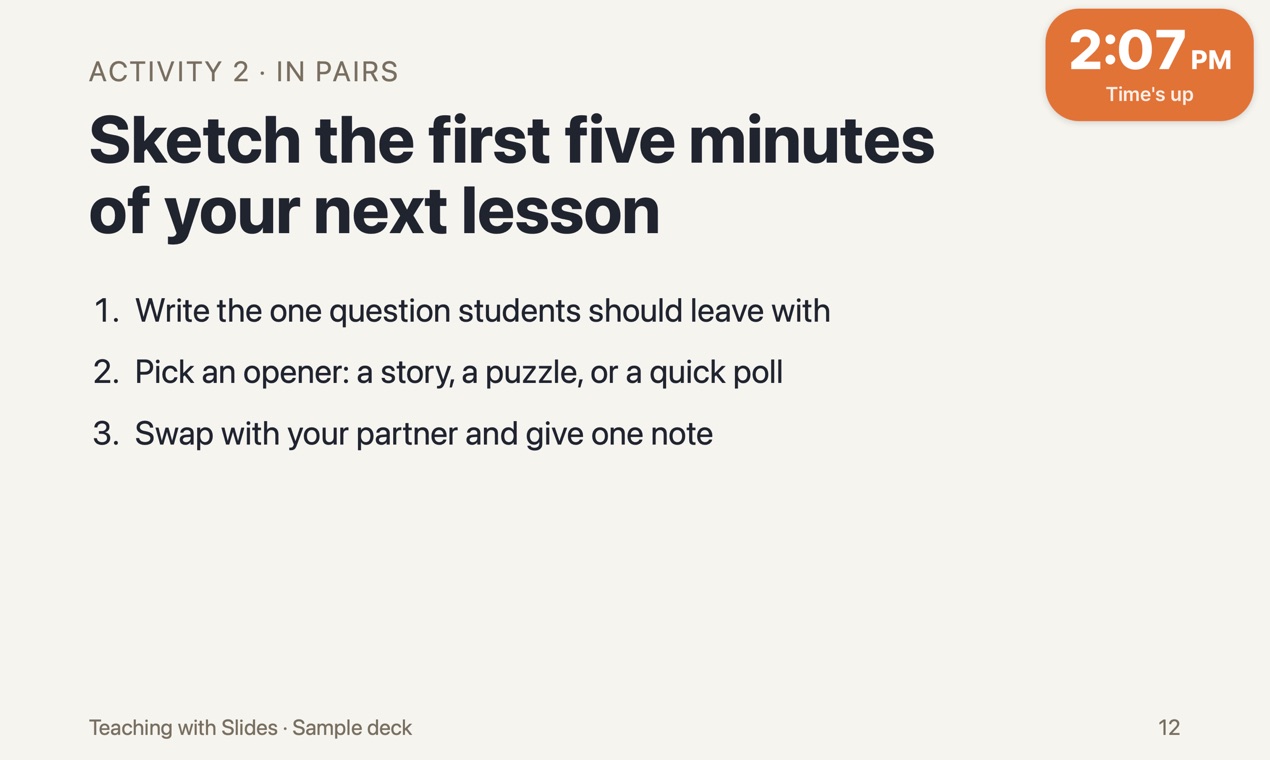
A countdown tells people how many minutes are left. Fadeclock also shows the end time in big type, until 2:30 PM, with the minutes left underneath. One look tells the room when the session ends.
Version 0.1. The timer, breaks and music are free. Pro adds start buttons for HTML slides and web pages.
Who it's for, and who it isn't
Fadeclock is made for workshops, classes and meetings where the room works to a deadline: "15 minutes, go." The timer is on the shared screen, so everyone sees it.
If you want a timer only you can see while you give a talk, this isn't that. Everything Fadeclock shows is on the slides in front of the audience.
How a timed session goes
- Pick a length from 1 minute up to 3 hours and press Start, or press ⌃⌥5 from any app for five minutes.
- The capsule shows the end time. From five minutes left it turns orange.
- At the end the whole capsule turns orange, says Time's up, and one chime plays.
Changing plans mid-session
Discussion running long? Hover over the capsule and click +, or press ⌃⌥1, ⌃⌥5 or ⌃⌥0 to add 1, 5 or 10 minutes. With ⇧ added, the same keys take time away. The timer keeps at least one minute. ⌃⌥X ends it, ⌃⌥M opens the timer window.
Readable from the back
There are four sizes: Small, Medium, Large and Extra large. The capsule takes one corner, top right by default, and you can drag it anywhere. It shows on the external display when one is connected.
Small things that matter on the day
- A 1-minute test plays the music, the fade-out and the end chime, so you can check the sound before people arrive.
- Your Mac's display won't go to sleep while the timer is on screen.
- The timer, the shortcuts and the end chime work offline. Only YouTube music needs the internet.
- There's no account and no analytics in the app.
Before you download
- Mac only, macOS 13 or later. There is no Windows version.
- Fadeclock is not notarized by Apple. The first time you open it, macOS blocks it and you allow it in System Settings. See the steps.
- If your Mac is managed by a school or company, that option may be turned off, and Fadeclock will not open on that Mac. The download is free, so check this before you buy anything.
- Tested over Keynote in presentation mode. PowerPoint and Google Slides haven't been tested yet.
- Built for Apple silicon and Intel Macs, but not yet run on an Intel Mac.